Showing posts with label Geolocation. Show all posts
Showing posts with label Geolocation. Show all posts
Wednesday, July 13, 2011
Secrets and surprises of the Google Geo APIs
Come learn about some new, some hidden, and some surprising features of the Maps API, Earth API, Fusion Tables and other APIs you may not even realise exist.

Tuesday, July 12, 2011
Location Based App development using Google APIs
Discover how Google APIs such as the Places API, Buzz API, and Latitude API can provide you with the services you need to build the next great location based app.
Friday, July 8, 2011
Tracking my location on mobile web with Google Map
In the post Get repeated position updates using Geolocation API, navigator.geolocation.watchPosition(), we know how to track our location using Geolocation API. In the post Mobile web with Google Map, we know how to embed Google Map in our mobile web page. Now, it's time to merge them together to have a Google Map tracking our location using Geolocation API.

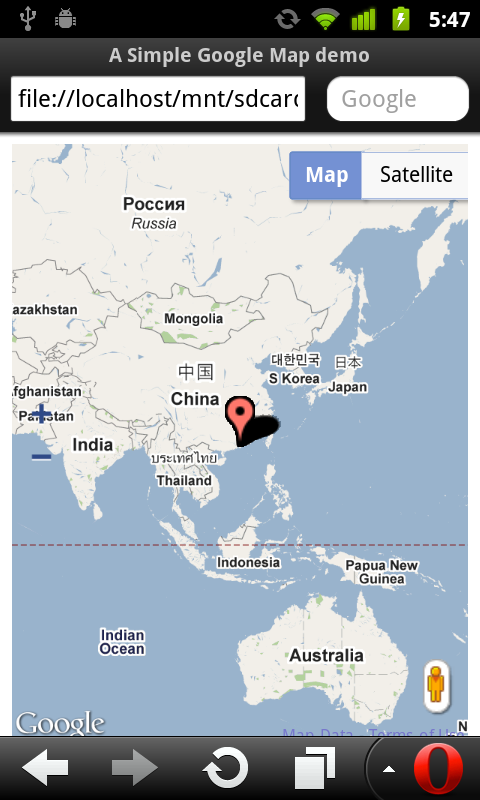
<!DOCTYPE html>
<html>
<head>
<meta name="viewport" content="initial-scale=1.0, user-scalable=no"/>
<title>A Simple Google Map demo</title>
<style type="text/css">
html { height: 100% }
body { height: 100%}
#mymap { height: 100% }
</style>
<script type="text/javascript" src="http://maps.google.com/maps/api/js?sensor=true"></script>
<script type="text/javascript">
var map;

function InitMap(){
 var options = {
   zoom: 2,
   center: new google.maps.LatLng(0, 0),
   mapTypeId: google.maps.MapTypeId.ROADMAP,

   zoomControl: true,
   zoomControlOptions: {
    style: google.maps.ZoomControlStyle.LARGE,
    position: google.maps.ControlPosition.LEFT_CENTER},

   streetViewControl: true,
   streetViewControlOptions: {
    position: google.maps.ControlPosition.RIGHT_BOTTOM}


 };

 map = new google.maps.Map(document.getElementById("mymap"), options);

 initLocation();
}

function initLocation(){
 if (window.navigator.geolocation) {
  navigator.geolocation.watchPosition(successCallback, errorCallback);
 } else {
  alert("Sorry! your browser does not support Geolocation API.");
 }
}

function successCallback(position){
 var currentPosition = new google.maps.LatLng(position.coords.latitude, position.coords.longitude);
 var marker = new google.maps.Marker({position: currentPosition});
 marker.setMap(map);
 map.setCenter(currentPosition);
}

function errorCallback(error) {
}

function htmlonload(){
  InitMap();
}
</script>
</head>
<body onload="htmlonload();">
<div id="mymap"></div>
</body>
</html>
Thursday, June 16, 2011
Get repeated position updates using Geolocation API, navigator.geolocation.watchPosition()
The post "Simple Geolocation API demo" show how to get one-shot position requests using Geolocation API, navigator.geolocation.getCurrentPosition(). We can get repeated position updates using navigator.geolocation.watchPosition().

Related post:
- Tracking my location on mobile web with Google Map
<!DOCTYPE html>
<html>
<head>
<script type="text/javascript">

function htmlonload(){


if (window.navigator.geolocation) {
 navigator.geolocation.watchPosition(successCallback, errorCallback);
} else {
 alert("Sorry! your browser does not support Geolocation API.");
}
}

function successCallback(position){
var msg ="";

msg += "Latitude: " + position.coords.latitude + "<br/>";
msg += "Longitude: " + position.coords.longitude + "<br/>";
msg += "Accuracy: " + position.coords.accuracy + "<br/>";
msg += "@" + position.timestamp;

  changeText("MyText", "My Location: " + msg);
}

function errorCallback(error) {
changeText("MyText", "Error: " + error);
}

function changeText(id, text){
document.getElementById(id).innerHTML = text;

}

</script>
<meta charset="UTF-8">
<title>Simple Geolocation API demo</title>
</head>
<body onload="htmlonload();">
<h1>Simple Geolocation API demo</h1>
<div id="MyText">Waiting...</div>

</body>
</html>

Related post:
- Tracking my location on mobile web with Google Map
Sunday, June 12, 2011
Get details of PositionError object
PositionError object defined at W3C Geolocation API, it hold properties of code and message of the error.
The code attribute must return the appropriate code from the following list:
The message attribute must return an error message describing the details of the error encountered. This attribute is primarily intended for debugging and developers should not use it directly in their application user interface.
example:
output:

The code attribute must return the appropriate code from the following list:
- PERMISSION_DENIED (numeric value 1)
The location acquisition process failed because the application origin does not have permission to use the Geolocation API. - POSITION_UNAVAILABLE (numeric value 2)
The position of the device could not be determined. For instance, one or more of the location providers used in the location acquisition process reported an internal error that caused the process to fail entirely. - TIMEOUT (numeric value 3)
The length of time specified by the timeout property has elapsed before the implementation could successfully acquire a new Position object.
The message attribute must return an error message describing the details of the error encountered. This attribute is primarily intended for debugging and developers should not use it directly in their application user interface.
example:
<!DOCTYPE html>
<html>
<head>
<script type="text/javascript">
if (window.navigator.geolocation) {
 navigator.geolocation.getCurrentPosition(successCallback, errorCallback);
} else {
 alert("Sorry! your browser does not support Geolocation API.");
}

function successCallback(position){
 var msg ="";

 msg += "Latitude: " + position.coords.latitude + "\n";
 msg += "Longitude: " + position.coords.longitude + "\n";
 msg += "Accuracy: " + position.coords.accuracy;

 alert(msg);
}

function errorCallback(error) {
 switch (error.code) {
  case error.PERMISSION_DENIED:
  alert("PERMISSION DENIED: " + error.message);
  break;
 case error.POSITION_UNAVAILABLE:
  alert("POSITION UNAVAILABLE: " + error.message);
  break;
 case error.TIMEOUT:
  alert("TIMEOUT: " + error.message);
  break;
 }
}

</script>
<meta charset="UTF-8">
<title>Simple Geolocation API demo</title>
</head>
<body>
<h1>Simple Geolocation API demo</h1>


</body>
</html>
output:

Saturday, June 11, 2011
Simple Geolocation API demo, one-shot position requests.
It's a simple HTML with Javascript to get user current position using W3C Geolocation API.
Geo.html
Result:
Run in Chrome under Ubuntu Linux on desktop PC - function errorCallback() is called with error of PositionError! (Refer to Get details of PositionError object)

Run in Opera mobile on Android phone - function successCallback() is called with my position.
(To test the HTML on Android mobile, simple copy the HTML file to SD Card, and open with browser)

Related Post:
- Get repeated position updates using Geolocation API, navigator.geolocation.watchPosition()
Geo.html
<!DOCTYPE html>
<html>
<head>
<script type="text/javascript">
if (window.navigator.geolocation) {
navigator.geolocation.getCurrentPosition(successCallback, errorCallback);
} else {
alert("Sorry! your browser does not support Geolocation API.");
}

function successCallback(position){
var msg ="";

msg += "Latitude: " + position.coords.latitude + "\n";
msg += "Longitude: " + position.coords.longitude + "\n";
msg += "Accuracy: " + position.coords.accuracy;

alert(msg);
}

function errorCallback(error) {
alert(error);
}

</script>
<meta charset="UTF-8">
<title>Simple Geolocation API demo</title>
</head>
<body>
<h1>Simple Geolocation API demo</h1>


</body>
</html>
Result:
Run in Chrome under Ubuntu Linux on desktop PC - function errorCallback() is called with error of PositionError! (Refer to Get details of PositionError object)

Run in Opera mobile on Android phone - function successCallback() is called with my position.
(To test the HTML on Android mobile, simple copy the HTML file to SD Card, and open with browser)

Related Post:
- Get repeated position updates using Geolocation API, navigator.geolocation.watchPosition()
W3C Geolocation API

W3C Geolocation API specification defines an API that provides scripted access to geographical location information associated with the hosting device.
link:
- http://www.w3.org/TR/geolocation-API/
Subscribe to:
Posts (Atom)