Showing posts with label Mobile Web. Show all posts

Friday, July 15, 2011

jQuery Mobile Exercise

A simple exercise using jQuery Mobile:

jQuery Mobile Exercise on OperaMobile running on Android
jQuery Mobile Exercise on Firefox running on Android
jQuery Mobile Exercise on Google Chrome running on Ubuntu desktop

<!DOCTYPE html>
<html>
<head>
<title>jQuery Mobile Exercise</title>
<link rel="stylesheet" href="http://code.jquery.com/mobile/1.0b1/jquery.mobile-1.0b1.css" />
<script src="http://code.jquery.com/jquery-1.6.2.min.js"></script>
<script src="http://code.jquery.com/mobile/1.0b1/jquery.mobile-1.0b1.js">
</script>
</head>
<body>

<section id="page1" data-role="page">
<header data-role="header"><h1>jQuery Mobile Exercise</h1></header>
<div class="content" data-role="content">
<p>Hello jQuery Mobile!</p>
</div>
<footer data-role="footer"><h1>http://icancode-4-web.blogspot.com/</h1></footer>
</section>

</body>
</html>

Friday, July 8, 2011

Tracking my location on mobile web with Google Map

In the post Get repeated position updates using Geolocation API, navigator.geolocation.watchPosition(), we know how to track our location using Geolocation API. In the post Mobile web with Google Map, we know how to embed Google Map in our mobile web page. Now, it's time to merge them together to have a Google Map tracking our location using Geolocation API.

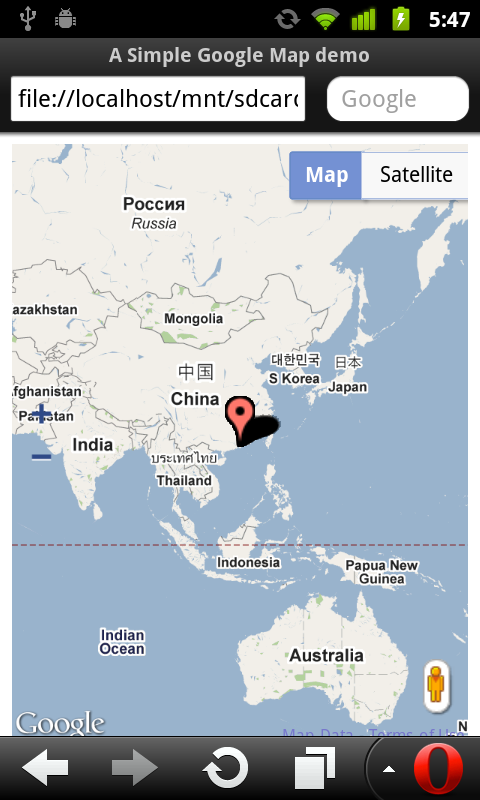
Treacking my location on mobile web with Google Map

<!DOCTYPE html>
<html>
<head>
<meta name="viewport" content="initial-scale=1.0, user-scalable=no"/>
<title>A Simple Google Map demo</title>
<style type="text/css">
html { height: 100% }
body { height: 100%}
#mymap { height: 100% }
</style>
<script type="text/javascript" src="http://maps.google.com/maps/api/js?sensor=true"></script>
<script type="text/javascript">
var map;

function InitMap(){
var options = {
zoom: 2,
center: new google.maps.LatLng(0, 0),
mapTypeId: google.maps.MapTypeId.ROADMAP,

zoomControl: true,
zoomControlOptions: {
style: google.maps.ZoomControlStyle.LARGE,
position: google.maps.ControlPosition.LEFT_CENTER},

streetViewControl: true,
streetViewControlOptions: {
position: google.maps.ControlPosition.RIGHT_BOTTOM}


};

map = new google.maps.Map(document.getElementById("mymap"), options);

initLocation();
}

function initLocation(){
if (window.navigator.geolocation) {
navigator.geolocation.watchPosition(successCallback, errorCallback);
} else {
alert("Sorry! your browser does not support Geolocation API.");
}
}

function successCallback(position){
var currentPosition = new google.maps.LatLng(position.coords.latitude, position.coords.longitude);
var marker = new google.maps.Marker({position: currentPosition});
marker.setMap(map);
map.setCenter(currentPosition);
}

function errorCallback(error) {
}

function htmlonload(){
InitMap();
}
</script>
</head>
<body onload="htmlonload();">
<div id="mymap"></div>
</body>
</html>

Wednesday, July 6, 2011

Mobile web with Google Map

Modify the HTML in last post Add custom control on Google Map with "viewport" added, to make it suitable for mobile device.

The HTML displayed on PC, Google Chrome.

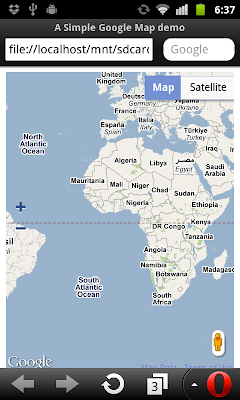
The HTML displayed on Android, Mobile Opera.

<!DOCTYPE html>
<html>
<head>
<meta name="viewport" content="initial-scale=1.0, user-scalable=no"/>
<title>A Simple Google Map demo</title>
<style type="text/css">
html { height: 100% }
body { height: 100%}
#mymap { height: 100% }
</style>
<script type="text/javascript" src="http://maps.google.com/maps/api/js?sensor=false"></script>
<script type="text/javascript">
var map;

function InitMap(){
var options = {
zoom: 2,
center: new google.maps.LatLng(0, 0),
mapTypeId: google.maps.MapTypeId.ROADMAP,

zoomControl: true,
zoomControlOptions: {
style: google.maps.ZoomControlStyle.LARGE,
position: google.maps.ControlPosition.LEFT_CENTER},

streetViewControl: true,
streetViewControlOptions: {
position: google.maps.ControlPosition.RIGHT_BOTTOM}


};

map = new google.maps.Map(document.getElementById("mymap"), options);
}

function htmlonload(){
InitMap();
}
</script>
</head>
<body onload="htmlonload();">
<div id="mymap"></div>
</body>
</html>


Next:
- Tracking my location on mobile web with Google Map

Tuesday, June 14, 2011

Mobile optimized HTML with meta viewport

Simple HTML with <meta name="viewport"> tag to make a web page optimized for mobile device.

<!DOCTYPE html>
<html>
<head>
<meta charset="UTF-8">
<meta name="viewport" content="width=device-width; user-scalable=0;" />
<title>Test viewport</title>
</head>
<body>

<h1>Test: with viewport on mobile device</h1>


</body>
</html>

With <meta name="viewport"> tag
With viewport tag
Without <meta name="viewport"> tag
Without viewport tag

Saturday, June 11, 2011

Simple Geolocation API demo, one-shot position requests.

It's a simple HTML with Javascript to get user current position using W3C Geolocation API.

Geo.html
<!DOCTYPE html>
<html>
<head>
<script type="text/javascript">
if (window.navigator.geolocation) {
navigator.geolocation.getCurrentPosition(successCallback, errorCallback);
} else {
alert("Sorry! your browser does not support Geolocation API.");
}

function successCallback(position){
var msg ="";

msg += "Latitude: " + position.coords.latitude + "\n";
msg += "Longitude: " + position.coords.longitude + "\n";
msg += "Accuracy: " + position.coords.accuracy;

alert(msg);
}

function errorCallback(error) {
alert(error);
}

</script>
<meta charset="UTF-8">
<title>Simple Geolocation API demo</title>
</head>
<body>
<h1>Simple Geolocation API demo</h1>


</body>
</html>


Result:
Run in Chrome under Ubuntu Linux on desktop PC - function errorCallback() is called with error of PositionError! (Refer to Get details of PositionError object)
Fail to run Geolocation API on desktop running Chrome

Run in Opera mobile on Android phone - function successCallback() is called with my position.
(To test the HTML on Android mobile, simple copy the HTML file to SD Card, and open with browser)
Geolocation API run on Android mobile

Related Post:
- Get repeated position updates using Geolocation API, navigator.geolocation.watchPosition()