To enable the code assist for jQuery in Aptana Studio 3, Download and Add the .sdocml file here: https://github.com/aptana/javascript-jquery.ruble/tree/master/support
Showing posts with label jQuery. Show all posts
Showing posts with label jQuery. Show all posts
Thursday, October 27, 2011

Friday, October 14, 2011
jQuery exercise: change font-size

<!DOCTYPE html>
<html>
<head>
<script src="http://code.jquery.com/jquery-latest.js"></script>
<style>
body { margin-left: 30px; margin-right: 15px; background-color: #ffffff }
h1{font: bold italic 20pt helvetica}

#mytext {
 font-size: 20px
}

</style>
</head>
<body>
<center>
<p id="mytext">Change TEXT size by UP/DOWN key</p>
</center>
<script>
$(function(){

 var KEY_UP = 38;
 var KEY_DOWN = 40;

 //Set listener for keydown
 $(document).keydown(function(e){
  $("#mytext2").html("- keydown -");
   switch(e.which){
    case KEY_UP:
     var fontsize = parseInt($("#mytext").css("font-size")) + 2;
     $("#mytext").css("font-size", fontsize+"px");
     break;
    case KEY_DOWN:
     var fontsize = parseInt($("#mytext").css("font-size")) - 2;
     $("#mytext").css("font-size", fontsize+"px");
     break;
   }
 });

});
</script>
</body>
</html>
Related: Implement Slider using HTML5 an JavaScript
Thursday, October 13, 2011
jQuery exercise: get key input, to change CSS layout.
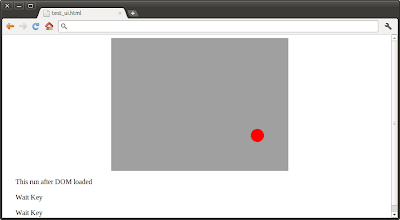
By merging of the exercises "jQuery exercise: get key input" and "Apply style on div", we can change the red dot position using JavaScript. When user press (also press and hold) UP, DOWN, LEFT or RIGHT key can move the red dot position.

<!DOCTYPE html>
<html>
<head>
<script src="http://code.jquery.com/jquery-latest.js"></script>
<style>
body { margin-left: 30px; margin-right: 15px; background-color: #ffffff }
h1{font: bold italic 20pt helvetica}

#background{
 background: #a0a0a0;
 width: 400px;
 height: 300px;
 position: relative;
 overflow: hidden;
}
#reddot {
 background: #f00;
 position: absolute;
 width: 30px;
 height: 30px;
 left: 185px;
 top: 135px;
 border-radius: 15px;
}

</style>
</head>
<body>
<center>
<div id="background">
 <div id="reddot"></div>
</div>
</center>
<p id="mytext1">Original Text</p>
<p id="mytext2">Wait Key</p>
<p id="mytext3">Wait Key</p>
<script>
$(function(){
 var str = "This run after DOM loaded";
 $("#mytext1").html(str);

 var KEY_UP = 38;
 var KEY_DOWN = 40;
 var KEY_LEFT = 37;
 var KEY_RIGHT = 39;

 //Set listener for keydown
 $(document).keydown(function(e){
  $("#mytext2").html("- keydown -");
   switch(e.which){
    case KEY_UP:
     var top = parseInt($("#reddot").css("top")) - 10;
     $("#reddot").css("top", top);
     $("#mytext3").html("Key: UP / " + left + " : " + top);
     break;
    case KEY_DOWN:
     var top = parseInt($("#reddot").css("top")) + 10;
     $("#reddot").css("top", top);
     $("#mytext3").html("Key: DOWN / " + left + " : " + top);
     break;
    case KEY_LEFT:
     var left = parseInt($("#reddot").css("left")) - 10;
     $("#reddot").css("left", left);
     $("#mytext3").html("Key: LEFT / " + left + " : " + top);
     break;
    case KEY_RIGHT:
     var left = parseInt($("#reddot").css("left")) + 10;
     $("#reddot").css("left", left);
     $("#mytext3").html("Key: RIGHT / " + left + " : " + top);
     break;
   }
 });

 //Set listener for keyup
 $(document).keyup(function(e){
  $("#mytext2").html("Wait Key");
  $("#mytext3").html("Wait Key");
 });
});
</script>
</body>
</html>
Wednesday, October 12, 2011
jQuery exercise: get key input
<!DOCTYPE html>
<html>
<head>
<script src="http://code.jquery.com/jquery-latest.js"></script>
</head>
<body>
<p id="mytext1">Original Text</p>
<p id="mytext2">Wait Key</p>
<p id="mytext3">Wait Key</p>
<script>
$(function(){
 var str = "This run after DOM loaded";
 $("#mytext1").html(str);

 var KEY_UP = 38;
 var KEY_DOWN = 40;
 var KEY_LEFT = 37;
 var KEY_RIGHT = 39;

 //Set listener for keydown
 $(document).keydown(function(e){
  $("#mytext2").html("- keydown -");
  switch(e.which){
   case KEY_UP:
    $("#mytext3").html("Key: UP");
    break;
   case KEY_DOWN:
    $("#mytext3").html("Key: DOWN");
    break;
   case KEY_LEFT:
    $("#mytext3").html("Key: LEFT");
    break;
   case KEY_RIGHT:
    $("#mytext3").html("Key: RIGHT");
    break;
  }
 });

 //Set listener for keyup
 $(document).keyup(function(e){
  $("#mytext2").html("Wait Key");
  $("#mytext3").html("Wait Key");
 });

});
</script>
</body>
</html>

jQuery exercise: change text
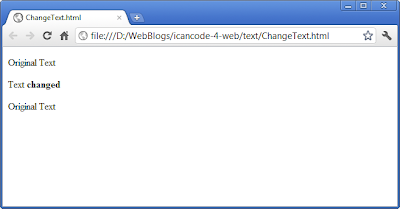
Exercise to change text using jQuery.
<!DOCTYPE html>
<html>
<head>
<script src="http://code.jquery.com/jquery-latest.js"></script>
</head>
<body>
<p id="mytext1">Original Text</p>
<p id="mytext2">Original Text</p>
<p id="mytext3">Original Text</p>
<script>
 var str = "Text <b>changed</b>";
 $("#mytext2").html(str);
</script>

</body>
</html>

Saturday, September 17, 2011
Define callback functions
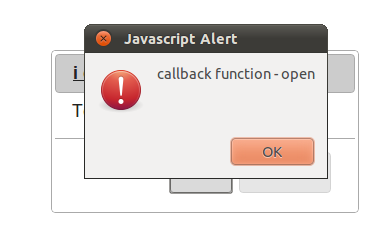
It's a example show how to define callback function; for example, open, close.

<!DOCTYPE html>
<html>
<head>
<meta charset="utf-8">
<script src="http://code.jquery.com/jquery-1.6.2.min.js"></script>
<script src="http://code.jquery.com/ui/1.8.16/jquery-ui.min.js"></script>
<link rel="stylesheet" href="http://code.jquery.com/ui/1.8.16/themes/smoothness/jquery-ui.css">
<title>jQuery UI Dialog</title>
</head>
<body>
 i can code! for Web.
 <div id="myDialog">
  Test Dialog of jQuery UI
 </div>
 <script>
  (function($){

    var functionOK = function(){
     alert("OK");
    },
    functionCancel = function(){
     alert("Cancel");
    },
    Options = {

     open: function() {
      alert("callback function - open");
     },

     close: function() {
      alert("callback function - close");
     },

     title: "<a href='http://icancode-4-web.blogspot.com/'>i can code! for Web.</a>",
     buttons:{
      "OK": functionOK,
      "Cancel": functionCancel
     }
    };

   $("#myDialog").dialog(Options);
   })(jQuery);
 </script>
</body>
</html>
Set dimensions of jQuery UI dialog
To set dimensions of jQuery UI dialog, we can use options of width, height, minWidth, minHeight, maxWidth, maxHeight.
example:

example:

<!DOCTYPE html>
<html>
<head>
<meta charset="utf-8">
<script src="http://code.jquery.com/jquery-1.6.2.min.js"></script>
<script src="http://code.jquery.com/ui/1.8.16/jquery-ui.min.js"></script>
<link rel="stylesheet" href="http://code.jquery.com/ui/1.8.16/themes/smoothness/jquery-ui.css">
<title>jQuery UI Dialog</title>
</head>
<body>
 i can code! for Web.
 <div id="myDialog">
  Test Dialog of jQuery UI
 </div>
 <script>
  (function($){

    var functionOK = function(){
     alert("OK");
    },
    functionCancel = function(){
     alert("Cancel");
    },
    Options = {

     width: 300,
     height: 200,
     minWidth: 200,
     minHeight: 200,
     maxWidth: 600,
     maxHeight: 250,

     title: "<a href='http://icancode-4-web.blogspot.com/'>i can code! for Web.</a>",
     buttons:{
      "OK": functionOK,
      "Cancel": functionCancel
     }
    };

   $("#myDialog").dialog(Options);
   })(jQuery);
 </script>
</body>
</html>
Tuesday, September 13, 2011
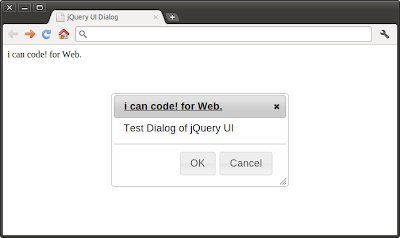
Add buttons in jQuery UI dialog
example:

<!DOCTYPE html>
<html>
<head>
<meta charset="utf-8">
<script src="http://code.jquery.com/jquery-1.6.2.min.js"></script>
<script src="http://code.jquery.com/ui/1.8.16/jquery-ui.min.js"></script>
<link rel="stylesheet" href="http://code.jquery.com/ui/1.8.16/themes/smoothness/jquery-ui.css">
<title>jQuery UI Dialog</title>
</head>
<body>
 i can code! for Web.
 <div id="myDialog">
  Test Dialog of jQuery UI
 </div>
 <script>
  (function($){

    var functionOK = function(){
     alert("OK");
    },
    functionCancel = function(){
     alert("Cancel");
    },
    Options = {
     title: "<a href='http://icancode-4-web.blogspot.com/'>i can code! for Web.</a>",
     buttons:{
      "OK": functionOK,
      "Cancel": functionCancel
     }
    };

   $("#myDialog").dialog(Options);
   })(jQuery);
 </script>
</body>
</html>
Set linkable title on jQuery UI dialog
example:


<!DOCTYPE html>
<html>
<head>
<meta charset="utf-8">
<script src="http://code.jquery.com/jquery-1.6.2.min.js"></script>
<script src="http://code.jquery.com/ui/1.8.16/jquery-ui.min.js"></script>
<link rel="stylesheet" href="http://code.jquery.com/ui/1.8.16/themes/smoothness/jquery-ui.css">
<title>jQuery UI Dialog</title>
</head>
<body>
 i can code! for Web.
 <div id="myDialog">
  Test Dialog of jQuery UI
 </div>
 <script>
  (function($){
   var Options = {
    title: "<a href='http://icancode-4-web.blogspot.com/'>i can code! for Web.</a>"
   };

   $("#myDialog").dialog(Options);
   })(jQuery);
 </script>
</body>
</html>
Monday, September 12, 2011
Example of jQuery UI - Dialog

<!DOCTYPE html>
<html>
<head>
<meta charset="utf-8">
<script src="http://code.jquery.com/jquery-1.6.2.min.js"></script>
<script src="http://code.jquery.com/ui/1.8.16/jquery-ui.min.js"></script>
<link rel="stylesheet" href="http://code.jquery.com/ui/1.8.16/themes/smoothness/jquery-ui.css">
<title>jQuery UI Dialog</title>
</head>
<body>
 i can code! for Web.
 <div id="myDialog" title="My Dialog">
  Test Dialog of jQuery UI
 </div>
 <script>
  (function($){
   $("#myDialog").dialog();
   })(jQuery);
 </script>
</body>
</html>
Saturday, September 10, 2011
Load jQuery from web page, without download.
To load jQuery, we can add the code below:
<script src="http://code.jquery.com/jquery-1.6.2.min.js"></script>
example:
<script src="http://code.jquery.com/jquery-1.6.2.min.js"></script>
example:
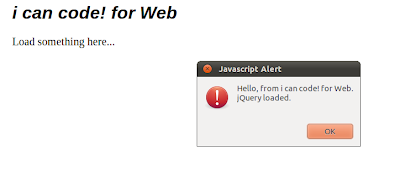
<html>
<head><title>Test CSS</title>
<script src="http://code.jquery.com/jquery-1.6.2.min.js"></script>
<style>
body { margin-left: 30px; margin-right: 15px; background-color: #ffffff }
h1{font: bold italic 24pt helvetica}
p { font-size: 20px; }
</style>
</head>
<body>
<h1>i can code! for Web</h1>
<p>Load something here...</p>
<script>
$(function(){
alert("Hello, from i can code! for Web.\n"
 + "jQuery loaded.");
});
</script>
</body>
</html>

Subscribe to:
Posts (Atom)