Showing posts with label HTML5. Show all posts

Friday, October 21, 2011

Implement Slider using HTML5 an JavaScript

This example show how to implement a slider using HTML5 and JavaScript. To demonstrate the effect, code from "jQuery exercise: change font-size" is borrowed, to change text size when slide is changed.

Implement Slider using HTML5 an JavaScript

<!DOCTYPE html>
<html>
<head>
<script src="http://code.jquery.com/jquery-latest.js"></script>
<style>
body { margin-left: 30px; margin-right: 15px; background-color: #ffffff }
h1{font: bold italic 20pt helvetica}

#mytext {
font-size: 20px
}

</style>
</head>
<body>
<center>
<input id="slide" type="range" min="8" max="50" value="20"? onChange="changeTextSize(this.value)" step="1"/>
<p id="mytext">Change TEXT size by Slider</p>

</center>
<script>

function changeTextSize(fontsize) {
$("#mytext").css("font-size", fontsize+"px");
}

</script>
</body>
</html>

Monday, October 17, 2011

Play mp4 using HTML5

Example to play mp4 in HTML5.

<!DOCTYPE html>
<html>
<head>
</head>
<body>

<video src="http://video.ch9.ms/ch9/51fe/77b82ce9-bbbc-4b9c-b19a-9f6b017551fe/MVP1understandingwptools_low_ch9.mp4"
controls autoplay loop>
<p>Sorry! Your browser doesn't support video.</p>
</video>

</body>
</html>


Play mp4 using HTML5


Sunday, September 25, 2011

Targeting screen sizes by using media queries

In this exercise, we have two css files, desktop.css and mobile.css. In our HTML, dualcss.html, we will load the suitable css according to the browser width (not the device screen width in this exercise).

desktop.css
mobile.css

desktop.css
body {
font-size: 50px;
font-weight: bold;
font-family: Arial;
}
a { font-style: italic; }
h1 {
font-size: 50px;
font-weight: bold;
font-family: Arial;
}


mobile.css
body {
font-size: 10px;
font-weight: bold;
font-family: Arial;
}
a { font-style: italic; }
h1 { font-style: italic; }


dualcss.html
<html>
<head>
<title>i can code! for Web: Dual CSS</title>

<link rel="stylesheet" type="text/css" href="mobile.css" media="only screen and (max-width: 480px)" />
<link rel="stylesheet" type="text/css" href="desktop.css" media="screen and (min-width: 481px)" />

</head>
<body>
<h1>i can code! for Web: Dual CSS</h1>
<p><a href="http://icancode-4-web.blogspot.com/">http://icancode-4-web.blogspot.com/</a></p>
</body>
</html>


Sunday, August 28, 2011

Javascript Exercise: Check if the browser support canvas

We can use the code document.createElement('canvas').getContext to check if the browser support HTML5 canvas feature. If the browser support HTML5 canvas feature, it return true, otherwise return false.

example:

Javascript Exercise: Check if the browser support canvas

<!DOCTYPE html>

<html>
<head>
<title>JavaScript Exercise</title>
<script type="text/javascript">

function CheckCanvas(){

if(document.createElement('canvas').getContext){
alert("OK. Your browser support canvas");
}else{
alert("Sorry! your brwser doesn't support canvas");
}

}


function htmlonload(){
CheckCanvas();
}
</script>
</head>
<body onload="htmlonload();">
JavaScript Exercise
</body>
</html>


Friday, June 3, 2011

HTML5/CSS3: Color with transparency, or opacity

example:
<!DOCTYPE html>
<html>
<head>
<style type="text/css">
body {
background-image:url("https://blogger.googleusercontent.com/img/b/R29vZ2xl/AVvXsEjNVG99cSIdxIuEdKyGvPEsrsuJsWhHLyEO4OHCAhgbSAR97ijeK1R4XZ41dnvMg_YV2M_TM4xHGAtMSw2GX57bndi-Xva5TEX86PSLnbwN9XsHDReKxxjBR47n6yi-snhDJtGfNYeBxI4/s200/editor.png");
}

.hsla_270_100_10_50 {
color:hsla(270, 100%, 10%, 0.5);
}
.hsla_270_100_50_50 {
color:hsla(270, 100%, 50%, 0.5);
}

.hsl_270_100_10 {
color:hsl(270, 100%, 10%);
}
.hsl_270_100_50 {
color:hsl(270, 100%, 50%);
}

.rgb_255_0_0{
color:rgb(255, 0, 0);
}

.rgba_255_0_0_50{
color:rgba(255, 0, 0, 0.5);
}

</style>
<meta charset="UTF-8">
<title>HTML5/CSS3: Color with transparency, or opacity</title>
</head>
<body>
<h1 class="hsl_270_100_10">color:hsl(270, 100%, 10%);</h1><h1 class="hsla_270_100_10_50">color:hsla(270, 100%, 10%, 0.5);</h1>
<h1 class="hsl_270_100_50">color:hsl(270, 100%, 50%);</h1><h1 class="hsla_270_100_50_50">color:hsla(270, 100%, 50%, 0.5);</h1>
<h1 class="rgb_255_0_0">color:rgb(255, 0, 0);</h1><h1 class="rgba_255_0_0_50">color:rgba(255, 0, 0, 0.5);</h1>

</body>
</html>
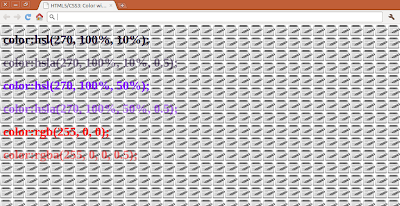

HTML5/CSS3: Color with transparency, or opacity

Wednesday, June 1, 2011

YouTube's iframe Player

Google I/O 2011: YouTube's iframe Player: The Future of Embedding


Jeffrey Posnick, Jarek Wilkiewicz, Greg Schechter

YouTube players allow for video playback in web applications. The latest YouTube's embedded iframe player supports both Flash and HTML5 video and exposes a rich API which lets you control the YouTube playback experience. We'll give you the details on how the API was developed, and show you how it can power the videos on your own website.

Set Width and Height of HTML5 embedded Video

example:
<video src="http://people.opera.com/shwetankd/webm/sunflower.webm"
controls autoplay loop>
<p>Your browser doesn't support WebM format.</p>
</video>
<video src="http://people.opera.com/shwetankd/webm/sunflower.webm"
controls autoplay loop width="320" height="240">
<p>Your browser doesn't support WebM format.</p>
</video>


Set Width and Height of HTML5 embedded Video

Tuesday, May 31, 2011

controls, autoplay and loop for HTML5 embedded video

The controls attribute is a boolean attribute. If present, it indicates that the author has not provided a scripted controller and would like the user agent to provide its own set of controls.

The autoplay attribute is a boolean attribute. When present, the user agent (as described in the algorithm described herein) will automatically begin playback of the media resource as soon as it can do so without stopping.

The loop attribute is a boolean attribute that, if specified, indicates that the media element is to seek back to the start of the media resource upon reaching the end.

example:
<video src="http://people.opera.com/shwetankd/webm/sunflower.webm"
controls autoplay loop>
<p>Your browser doesn't support WebM format.</p>
</video>

Monday, May 30, 2011

Very basic to embed WebM in HTML5

Very basic to embed WebM in HTML5 is something like it:

<video src="source url of WebM"
controls>
</video>

example:
<!DOCTYPE html>
<html>
<head>
<meta charset="UTF-8">
<title>HTML5 WebM Video</title>
</head>
<body>
<h1>Hello HTML5: WebM Video</h1>
<video src="http://people.opera.com/shwetankd/webm/sunflower.webm"
controls>
<p>Your browser doesn't support WebM format.</p>
</video>

</body>
</html>


WebM in HTML5

Sunday, May 29, 2011

Linking between HTML input and Javascript/canvas

example:
Linking between HTML input and Javascript/canvas

<!DOCTYPE html>
<html>
<head>
<meta charset="UTF-8">
<title>i can code! for Web::HTML5 Canvas</title>
<script type="text/javascript">
var mycontext;

function canvasloader(){
var mycanvas = document.getElementById("canvas");
mycontext = mycanvas.getContext("2d");

var formElement = document.getElementById("textin");
formElement.addEventListener("keyup", textinChanged, false);

}

function textinChanged(e){
var target = e.target;
text = target.value;
mycontext.fillStyle = "#000000";
mycontext.fillText(text, 50, 50);
}

</script>
</head>
<body onload="canvasloader();">
<h1>i can code! for Web::HTML5 Canvas</h1>
http://icancode-4-web.blogspot.com/<br/>

<canvas id="canvas" style="border: 1px solid;" width="360" height="100">
Sorry! Your browser doesn't support Canvas.
</canvas>
<form>
<input id="textin" />
</form>
</body>
</html>

Apply shadow on HTML5 canvas

example:
Apply shadow on HTML5 canvas

function canvasloader(){
var mycanvas = document.getElementById("canvas");
var mycontext = mycanvas.getContext("2d");
appyShadow(mycontext);

drawSquare(mycontext);
drawText(mycontext);

}

function appyShadow(context){
context.shadowOffsetX = 5;
context.shadowOffsetY = 5;
context.shadowColor = 'black';
context.shadowBlur = 5;
}


function drawText(context){
var myText = "Hello HTML5";
context.fillStyle = "#FF0000";
context.fillText (myText, 50, 50);
context.fillStyle = "#00FF00";
context.fillText (myText, 100, 100);
context.fillStyle = "#0000FF";
context.fillText (myText, 150, 150);
}

function drawSquare(context){
context.fillStyle = "gray";
context.fillRect(25,25,200,200);
}


Saturday, May 28, 2011

browser based visual authoring of HTML5 user interfaces

Maqetta is an open source project that provides WYSIWYG visual authoring of HTML5 user interfaces. The Maqetta application itself is authored in HTML, and therefore runs in the browser without requiring additional plugins or downloads.

Basic Text on HTML5 canvas

example:
Basic Text on HTML5 canvas

function canvasloader(){
var mycanvas = document.getElementById("canvas");
var mycontext = mycanvas.getContext("2d");

drawText(mycontext);
}


function drawText(context){
var myText = "Hello HTML5";
context.fillStyle = "#FF0000";
context.fillText (myText, 50, 50);
context.fillStyle = "#00FF00";
context.fillText (myText, 100, 100);
context.fillStyle = "#0000FF";
context.fillText (myText, 150, 150);
}


Apply scale on HTML5 canvas

example:
Apply scale on HTML5 canvas

var mycontext;
var myImage;

function canvasloader(){
var mycanvas = document.getElementById("canvas");
mycontext = mycanvas.getContext("2d");

myImage = new Image();
myImage.src = "https://blogger.googleusercontent.com/img/b/R29vZ2xl/AVvXsEjNVG99cSIdxIuEdKyGvPEsrsuJsWhHLyEO4OHCAhgbSAR97ijeK1R4XZ41dnvMg_YV2M_TM4xHGAtMSw2GX57bndi-Xva5TEX86PSLnbwN9XsHDReKxxjBR47n6yi-snhDJtGfNYeBxI4/s200/editor.png";
myImage.addEventListener("load", myImageLoaded , false);
}

function myImageLoaded(){
doScale(mycontext, 0.5);
mycontext.drawImage(myImage, 0, 0);
doScale(mycontext, 1);
mycontext.drawImage(myImage, 100, 0);
doScale(mycontext, 2);
mycontext.drawImage(myImage, 200, 0);
}

function doScale(context, scale){
context.setTransform(1,0,0,1,0,0); //identity matrix
context.scale(scale, scale); //x scale, y scale
}

Friday, May 27, 2011

Translate + Rotate canvas

example:
Translate + Rotate canvas

<script type="text/javascript">

var mycontext;
var myImage;

function canvasloader(){
var mycanvas = document.getElementById("canvas");
mycontext = mycanvas.getContext("2d");

myImage = new Image();
myImage.src = "https://blogger.googleusercontent.com/img/b/R29vZ2xl/AVvXsEjNVG99cSIdxIuEdKyGvPEsrsuJsWhHLyEO4OHCAhgbSAR97ijeK1R4XZ41dnvMg_YV2M_TM4xHGAtMSw2GX57bndi-Xva5TEX86PSLnbwN9XsHDReKxxjBR47n6yi-snhDJtGfNYeBxI4/s200/editor.png";
myImage.addEventListener("load", myImageLoaded , false);
}

function myImageLoaded(){
doTransform(mycontext);
mycontext.drawImage(myImage, 0, 0);
}

function doTransform(context){
context.setTransform(1,0,0,1,0,0); //identity matrix
context.translate(100, 100);
var rotateAngle = 45 * Math.PI/180; //clockwise rotation angle expressed in radians
context.rotate(rotateAngle);
}

</script>

Draw image on canvas, drawImage()

example:
Draw image on canvas

<!DOCTYPE html>
<html>
<head>
<meta charset="UTF-8">
<title>HTML5 Canvas: Draw Image</title>
<script type="text/javascript">

var mycontext;
var myImage;

function canvasloader(){
var mycanvas = document.getElementById("canvas");
mycontext = mycanvas.getContext("2d");

myImage = new Image();
myImage.src = "https://blogger.googleusercontent.com/img/b/R29vZ2xl/AVvXsEjNVG99cSIdxIuEdKyGvPEsrsuJsWhHLyEO4OHCAhgbSAR97ijeK1R4XZ41dnvMg_YV2M_TM4xHGAtMSw2GX57bndi-Xva5TEX86PSLnbwN9XsHDReKxxjBR47n6yi-snhDJtGfNYeBxI4/s200/editor.png";
myImage.addEventListener("load", myImageLoaded , false);
}

function myImageLoaded(){
mycontext.drawImage(myImage, 0, 0);
mycontext.drawImage(myImage, 100, 100);
mycontext.drawImage(myImage, 200, 200);
}

</script>
</head>
<body onload="canvasloader();">
<h1>HTML5 Canvas: Draw Image</h1>

<canvas id="canvas" style="border: 1px solid;" width="320" height="240">
Sorry! Your browser doesn't support Canvas.
</canvas>

</body>
</html>


Thursday, May 26, 2011

Translate canvas

To translate HTML5 canvas
  • Apply setTransform() before drawing
  • setTransform() with a identity matrix - (1,0,0,1,0,0)
  • call translate with the translation distance in the horizontal and vertical direction
  • draw!


example:
- without Translate
without Translate

- with Translate
with Translate

function canvasloader(){
var mycanvas = document.getElementById("canvas");
var mycontext = mycanvas.getContext("2d");
mycontext.fillStyle = "#0000ff";
mycontext.fillRect(0, 0, 150, 100);
doTransform(mycontext);
drawPath(mycontext);

}

function drawPath(context){
context.strokeStyle = "#000000";
context.lineWidth = 10;
context.beginPath();
context.moveTo(0, 0);
context.lineTo(150, 0);
context.lineTo(150, 100);
context.lineTo(00, 100);
context.closePath();
context.stroke();

}

function doTransform(context){
context.setTransform(1,0,0,1,0,0); //identity matrix
context.translate(100, 100);
}

Wednesday, May 25, 2011

Rotate canvas

To rotate HTML5 canvas
- Apply setTransform() before drawing
- setTransform() with a identity matrix - (1,0,0,1,0,0)
- call rotate with clockwise rotation angle expressed in radians
- draw!

example:
- without rotate:
without rotate
- with rotate:
with rotate

function canvasloader(){
var mycanvas = document.getElementById("canvas");
var mycontext = mycanvas.getContext("2d");
mycontext.fillStyle = "#A0A0A0";
mycontext.fillRect(10, 10, 300, 220);
mycontext.fillStyle = "#00ff00";
mycontext.fillRect(20, 20, 200, 100);
mycontext.fillStyle = "#0000ff";
mycontext.fillRect(200, 100, 100, 100);
doTransform(mycontext);
drawPath(mycontext);

}

function drawPath(context){
context.strokeStyle = "#000000";
context.lineWidth = 10;
context.beginPath();
context.moveTo(50, 50);
context.lineTo(150, 50);
context.lineTo(150, 100);
context.lineTo(50, 100);
context.closePath();
context.stroke();

}

function doTransform(context){
context.setTransform(1,0,0,1,0,0); //set transformation matrix as identity matrix
var rotateAngle = 45 * Math.PI/180; //clockwise rotation angle expressed in radians
context.rotate(rotateAngle);
}

Sunday, May 22, 2011

quadraticCurveTo() and bezierCurveTo()

function drawCurveTo(context){

context.strokeStyle = "#000000";
context.lineWidth = 5;

context.moveTo(50, 0)
context.quadraticCurveTo(150,100,0,50);

context.moveTo(0, 150);
context.bezierCurveTo(125, 0,175,300,300,150);

context.stroke();
}


quadraticCurveTo() and bezierCurveTo()

Saturday, May 21, 2011

contenteditable in HTML5

Create a simple HTML file, include a paragraph tag <p>., with attribute of contenteditable.

Open it with a browser support HTML5.

The content of the paragraph become editable, you can change the content. And save the page as a new HTML file. It can be noticed that the content will updated with your input.

<!DOCTYPE html>  
<html lang="en">
<head>
<meta charset="utf-8">
<title>i can code! for Web</title>
</head>
<body>
<h1>i can code! for Web</h1>
You can edit the text below.
Save as another HTML file, the content will updated with your input.
<p contenteditable=true>
http://icancode-4-web.blogspot.com/
</p>
</body>
</html>


contenteditable in HTML5