Thursday, July 14, 2011

JavaScript Exercises - arguments to function

JavaScript Exercises - arguments to function


<!DOCTYPE html>
<html>
<head>
<title>JavaScript Exercise</title>
<script type="text/javascript">

function handle_arguments(){
var number_of_arguments = arguments.length;
var list_of_arguments = "";
var msg;
var i;

for(i = 0; i < number_of_arguments; i++){
list_of_arguments += i + " : " + arguments[i] + "\n";
}

msg = "Number of arguments = " + number_of_arguments + "\n"
+ "List of arguments : \n" + list_of_arguments;
alert(msg);
}

function exercise(){

var j = "Javascript Exercise";
var not_init;
var its_null = null;
handle_arguments(1, "Hello", 3, j, not_init, its_null);
}


function htmlonload(){
exercise();
}
</script>
</head>
<body onload="htmlonload();">
JavaScript Exercise
</body>
</html>

Wednesday, July 13, 2011

Secrets and surprises of the Google Geo APIs


Come learn about some new, some hidden, and some surprising features of the Maps API, Earth API, Fusion Tables and other APIs you may not even realise exist.

Tuesday, July 12, 2011

Location Based App development using Google APIs


Discover how Google APIs such as the Places API, Buzz API, and Latitude API can provide you with the services you need to build the next great location based app.

Monday, July 11, 2011

Free Code Editor for Windows, Mac and Linux: Komodo Edit for Perl, Python, Tcl, PHP, Ruby, Javascript

Komodo Edit is a fast, smart, free and open-source code editor. You can code for PHP, Python, Ruby, JavaScript, Perl, Tcl, XML, HTML 5, CSS 3, with (customizable) syntax coloring, folding, background syntax checking, and excellent auto-complete and calltips (called "code intelligence").


Saturday, July 9, 2011

Eclipse IDE for JavaScript Web Developers


Eclipse IDE for JavaScript Web Developers is tools for JavaScript developers creating Web applications, including a JavaScript IDE, tools for JavaScript, HTML, CSS, and XML.

Download page:
- http://eclipse.org/downloads/packages/eclipse-ide-javascript-web-developers/indigor

Friday, July 8, 2011

Tracking my location on mobile web with Google Map

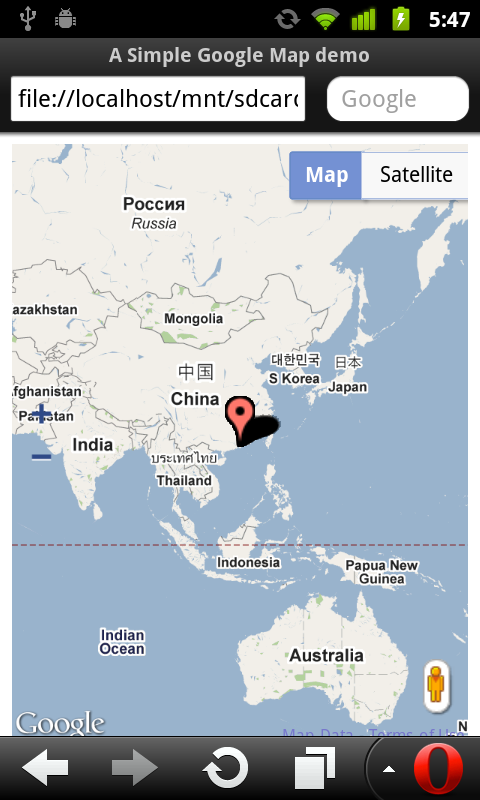
In the post Get repeated position updates using Geolocation API, navigator.geolocation.watchPosition(), we know how to track our location using Geolocation API. In the post Mobile web with Google Map, we know how to embed Google Map in our mobile web page. Now, it's time to merge them together to have a Google Map tracking our location using Geolocation API.

Treacking my location on mobile web with Google Map

<!DOCTYPE html>
<html>
<head>
<meta name="viewport" content="initial-scale=1.0, user-scalable=no"/>
<title>A Simple Google Map demo</title>
<style type="text/css">
html { height: 100% }
body { height: 100%}
#mymap { height: 100% }
</style>
<script type="text/javascript" src="http://maps.google.com/maps/api/js?sensor=true"></script>
<script type="text/javascript">
var map;

function InitMap(){
var options = {
zoom: 2,
center: new google.maps.LatLng(0, 0),
mapTypeId: google.maps.MapTypeId.ROADMAP,

zoomControl: true,
zoomControlOptions: {
style: google.maps.ZoomControlStyle.LARGE,
position: google.maps.ControlPosition.LEFT_CENTER},

streetViewControl: true,
streetViewControlOptions: {
position: google.maps.ControlPosition.RIGHT_BOTTOM}


};

map = new google.maps.Map(document.getElementById("mymap"), options);

initLocation();
}

function initLocation(){
if (window.navigator.geolocation) {
navigator.geolocation.watchPosition(successCallback, errorCallback);
} else {
alert("Sorry! your browser does not support Geolocation API.");
}
}

function successCallback(position){
var currentPosition = new google.maps.LatLng(position.coords.latitude, position.coords.longitude);
var marker = new google.maps.Marker({position: currentPosition});
marker.setMap(map);
map.setCenter(currentPosition);
}

function errorCallback(error) {
}

function htmlonload(){
InitMap();
}
</script>
</head>
<body onload="htmlonload();">
<div id="mymap"></div>
</body>
</html>

Wednesday, July 6, 2011

Mobile web with Google Map

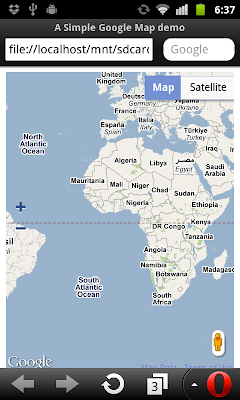
Modify the HTML in last post Add custom control on Google Map with "viewport" added, to make it suitable for mobile device.

The HTML displayed on PC, Google Chrome.

The HTML displayed on Android, Mobile Opera.

<!DOCTYPE html>
<html>
<head>
<meta name="viewport" content="initial-scale=1.0, user-scalable=no"/>
<title>A Simple Google Map demo</title>
<style type="text/css">
html { height: 100% }
body { height: 100%}
#mymap { height: 100% }
</style>
<script type="text/javascript" src="http://maps.google.com/maps/api/js?sensor=false"></script>
<script type="text/javascript">
var map;

function InitMap(){
var options = {
zoom: 2,
center: new google.maps.LatLng(0, 0),
mapTypeId: google.maps.MapTypeId.ROADMAP,

zoomControl: true,
zoomControlOptions: {
style: google.maps.ZoomControlStyle.LARGE,
position: google.maps.ControlPosition.LEFT_CENTER},

streetViewControl: true,
streetViewControlOptions: {
position: google.maps.ControlPosition.RIGHT_BOTTOM}


};

map = new google.maps.Map(document.getElementById("mymap"), options);
}

function htmlonload(){
InitMap();
}
</script>
</head>
<body onload="htmlonload();">
<div id="mymap"></div>
</body>
</html>


Next:
- Tracking my location on mobile web with Google Map